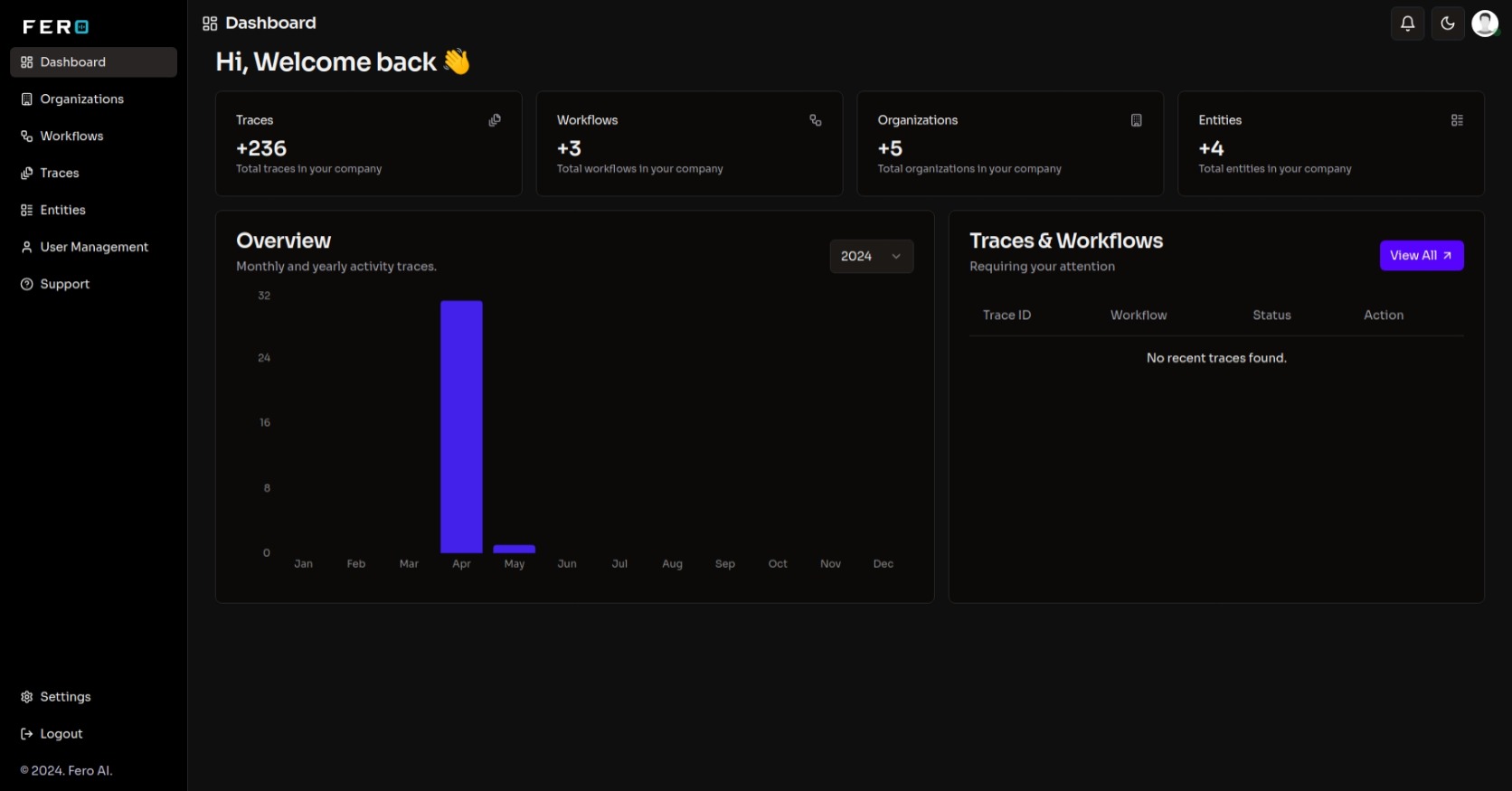
Now with route optimisation and demand forecasting

    Move the data. Solve the route. Run the operation.

    CrossDock connects your carriers, TMS and ERP — then optimises what flows through them, with a real vehicle-routing solver and demand forecasting built in. Most integration platforms stop at the first sentence.

    • Vehicle routing solver
    • Demand forecasting
    • XML · JSON · CSV · XLSX
    Live flow3 sources · 3 destinations
    Forwarder TMSXMLCustomer ERPJSONSFTP dropCSVCarrier APIRESTWarehouse WMSXMLOps dashboardliveCrossDockmap"weight": 240<Wgt>240</Wgt>

    Trusted by logistics teams in 15+ countries

    • adso
    • bollore
    • chef_me
    • dp_world
    • dsv_logo
    • g10
    • gulftainer
    • helllmann
    • momentum
    • nespresso
    • noatumlogo
    • northladder
    • rsa_global
    • rstg
    • sky_express

    +20%

    Increase in dashboard usage

    +15%

    Efficiency gain in workflow management

    +25%

    Customer satisfaction with user management

    −30%

    Reduction in error rates with Trace

    Why CrossDock

    Built for freight, not adapted to it

    Generic iPaaS tools assume clean APIs on both ends and stop once the data has moved. Logistics gives you neither.

    Simplified logistics connectivity

    Built for the messy reality of freight systems — carrier portals, legacy TMS, customer ERPs and the SFTP drop nobody wants to touch.


    Automated data mapping

    Map fields once and CrossDock handles translation between JSON, XML, CSV and XLSX in both directions.

    Customizable workflow builder

    Compose the flow visually — fetch, transform, branch, enrich and deliver — without shipping a new service for every integration.

    Scheduling and versioning

    Cron schedules per workflow, with every workflow versioned so you can see what changed and roll back when a partner moves the goalposts.

    Manual overrides for exceptions

    Inspect a failed payload, patch it and replay it. Exceptions get handled in the product instead of over email.

    AI where it earns its place

    Classify and parse the emails your partners insist on sending, and generate a first-pass field mapping from a sample payload — reviewed by you before anything goes live.

    The part nobody else does

    Integration is table stakes. Optimisation is the point.

    Once your data is flowing, CrossDock can act on it — solving routes and forecasting demand inside the same workflow that moved the file.

    Vehicle routing solver

    A genuine metaheuristic VRP solver, running in the workflow engine rather than behind a separate tool. Feed it stops, a fleet and constraints; get back sequenced routes.

    Constraints
    Capacity, time windows, vehicle counts
    Problem size
    Up to 2,000 jobs per solve
    Distances
    Your routing matrix, or Haversine

    Demand forecasting

    Statistical time-series forecasting on the volumes already moving through your integrations — no export to a data science notebook and back.

    Models
    AutoETS and MSTL decomposition
    Seasonality
    Detected automatically
    Output
    Point forecast with confidence intervals

    Packing, order splitting and consolidation are available as workflow blocks too, served by our optimisation service.

    What is in the box

    Blocks you compose, not code you maintain

    Every workflow is built from these. No connector to write, no service to deploy.

    Connect

    Reach the systems your operation already runs on.

    • REST / HTTP
    • SFTP
    • Outlook (Microsoft Graph)
    • Gmail
    • SMTP
    • Google Drive
    • Azure Blob Storage
    • PostgreSQL
    • MySQL
    • MongoDB

    Transform

    Get the payload into the shape the other side expects.

    • JSON ↔ XML
    • CSV → JSON
    • Excel → JSON
    • Field mapping
    • Schema validation
    • Custom JavaScript
    • Custom Python

    Decide

    Optimise and interpret, not just move.

    • Vehicle routing solver
    • Demand forecasting
    • Packing & consolidation
    • Email classification
    • Email parsing
    • Claude and Groq models

    Act

    Do something with the result, on a schedule or on demand.

    • Cron scheduling
    • Webhooks with retry
    • Human approval steps
    • PDF generation
    • Charts and dashboards
    • Embeddable widgets
    Use cases

    One platform, every hand-off

    Design and implement custom workflows.
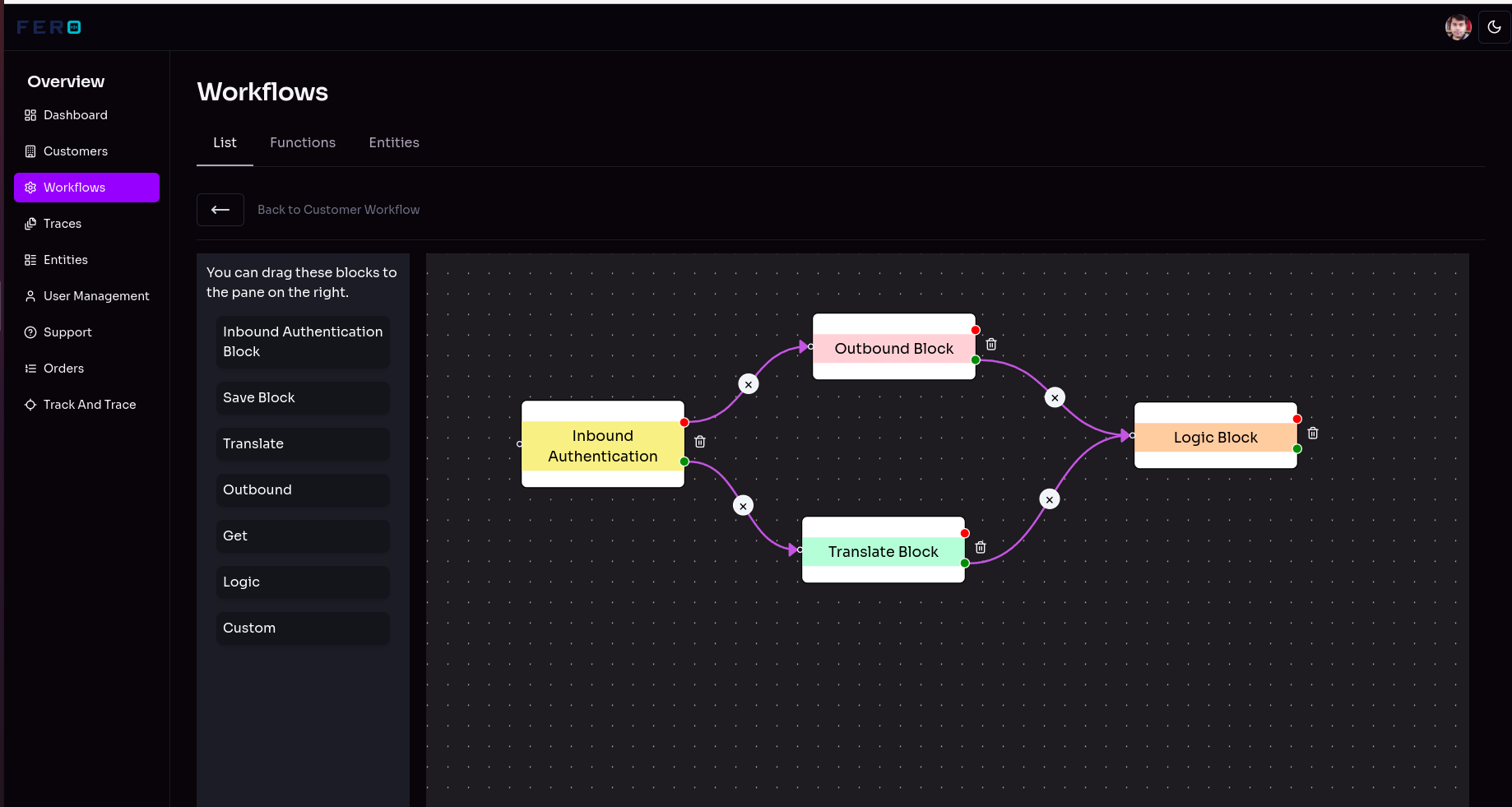
    Design and implement custom workflows.

    Easy workflow, powerful results

    A simplified process for building and running API mappings.

    1. 1

      Create and manage workflows

      Create, view, edit and manage every integration from one list — no digging through a repo to find out what talks to whom.
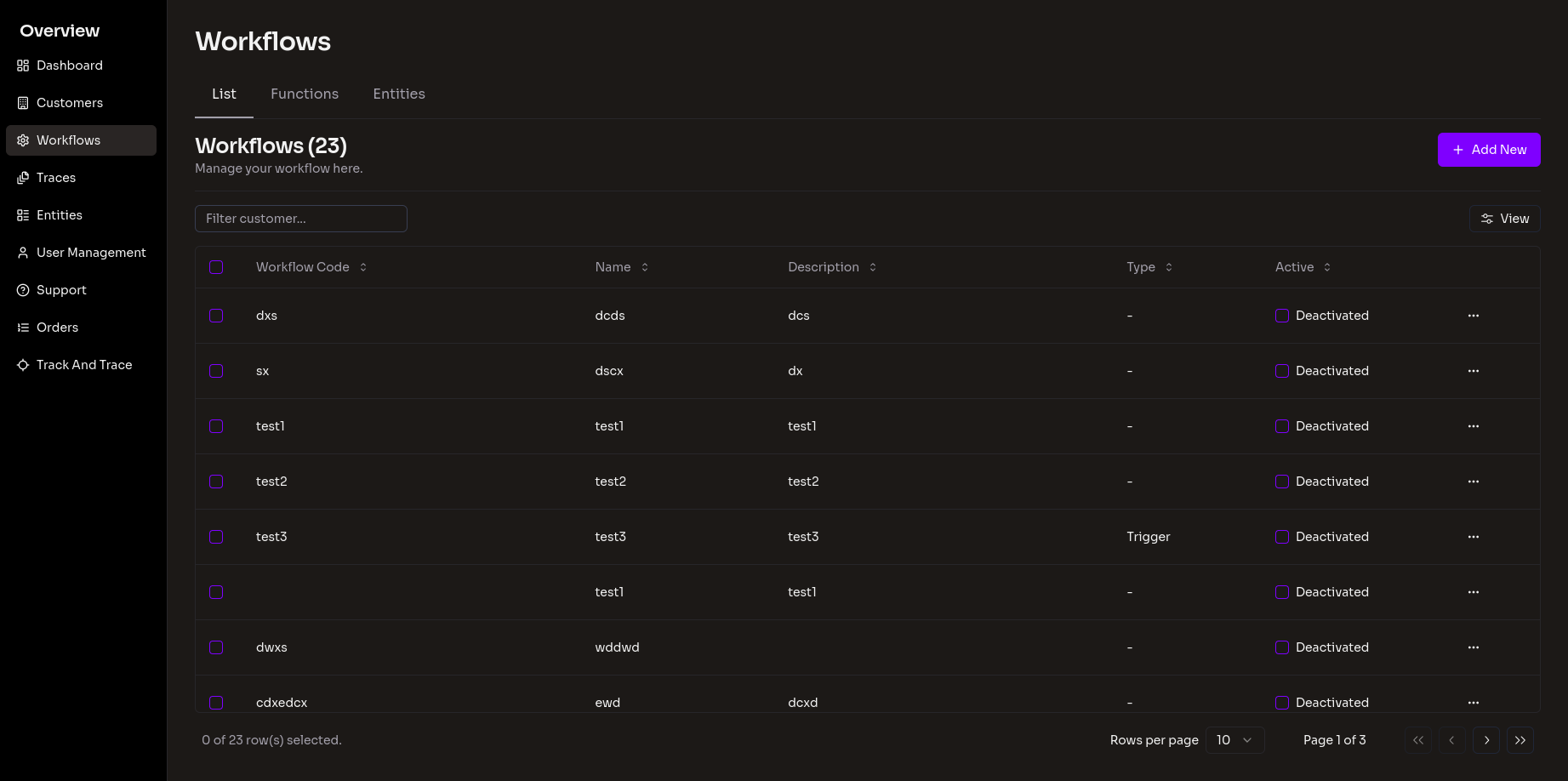
      Create and manage workflows
    2. 2

      Describe the workflow

      Give it a name, an owner and a description so the rest of the team knows what it is for six months from now.
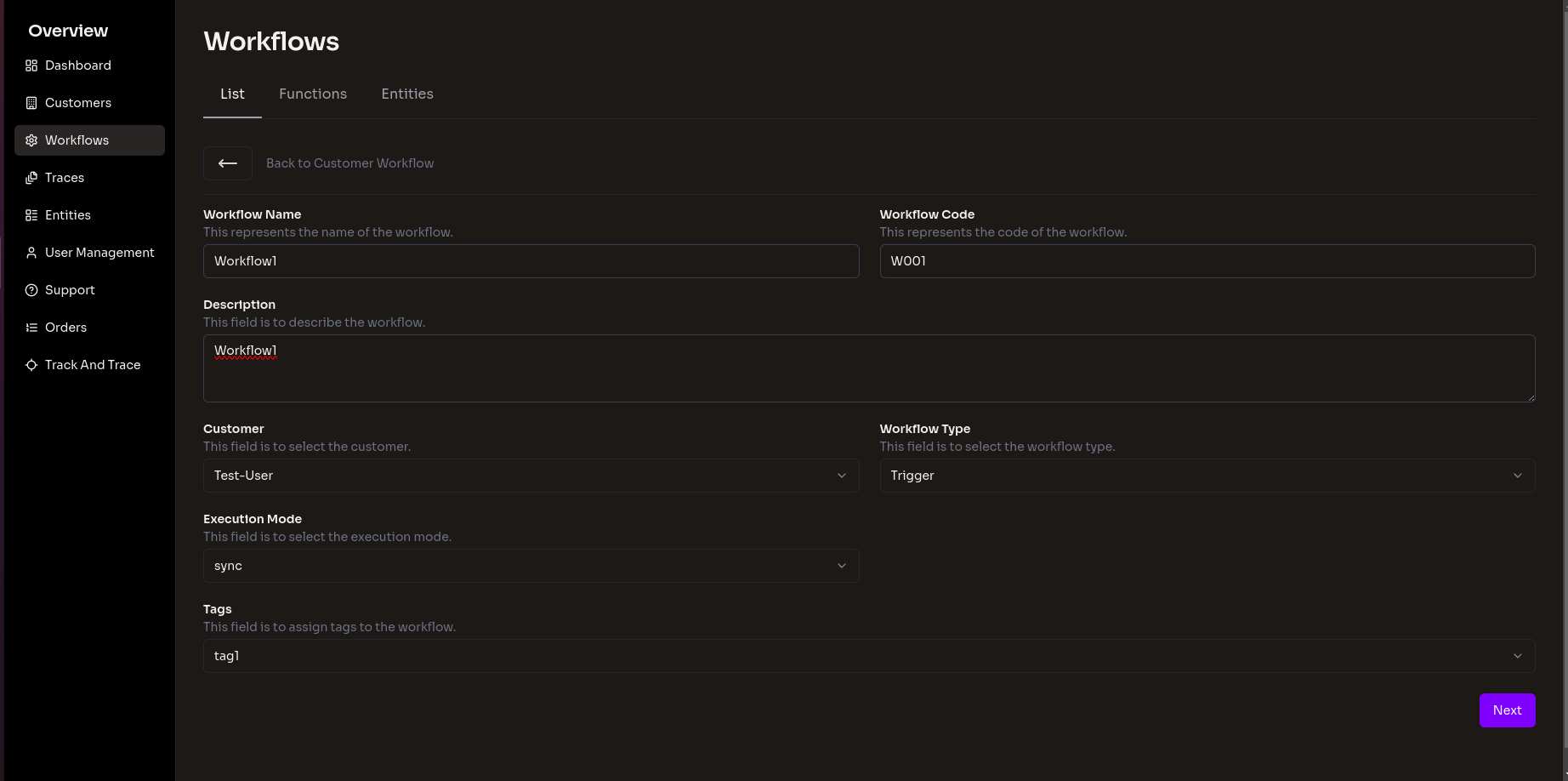
      Describe the workflow
    3. 3

      Build the flow visually

      Drag in the blocks you need — fetch, transform, branch, enrich, deliver — and wire them together on the canvas.
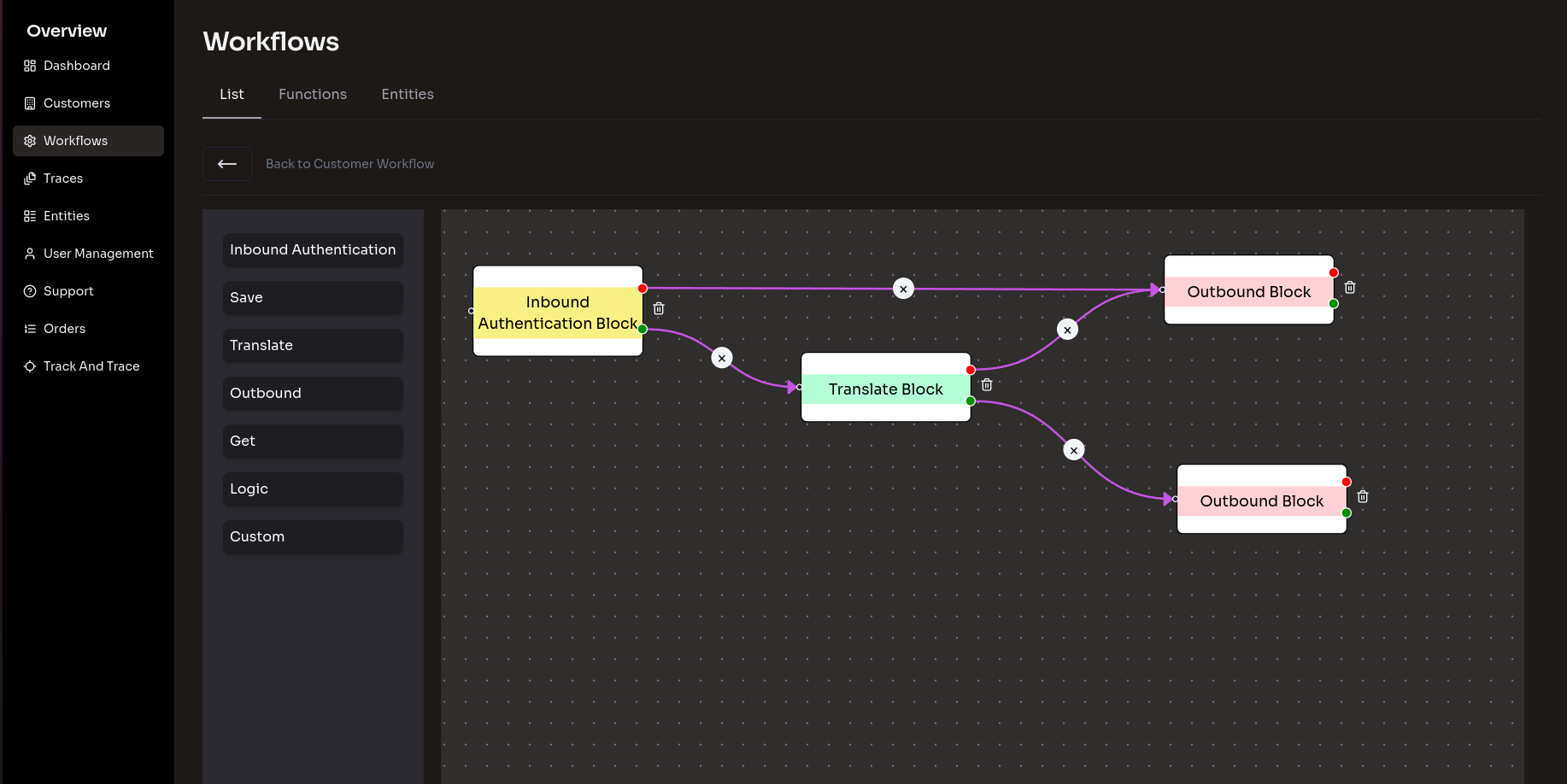
      Build the flow visually
    4. 4

      Configure each block

      Set credentials, field mappings and retry behaviour per block, then test it against a real payload before going live.
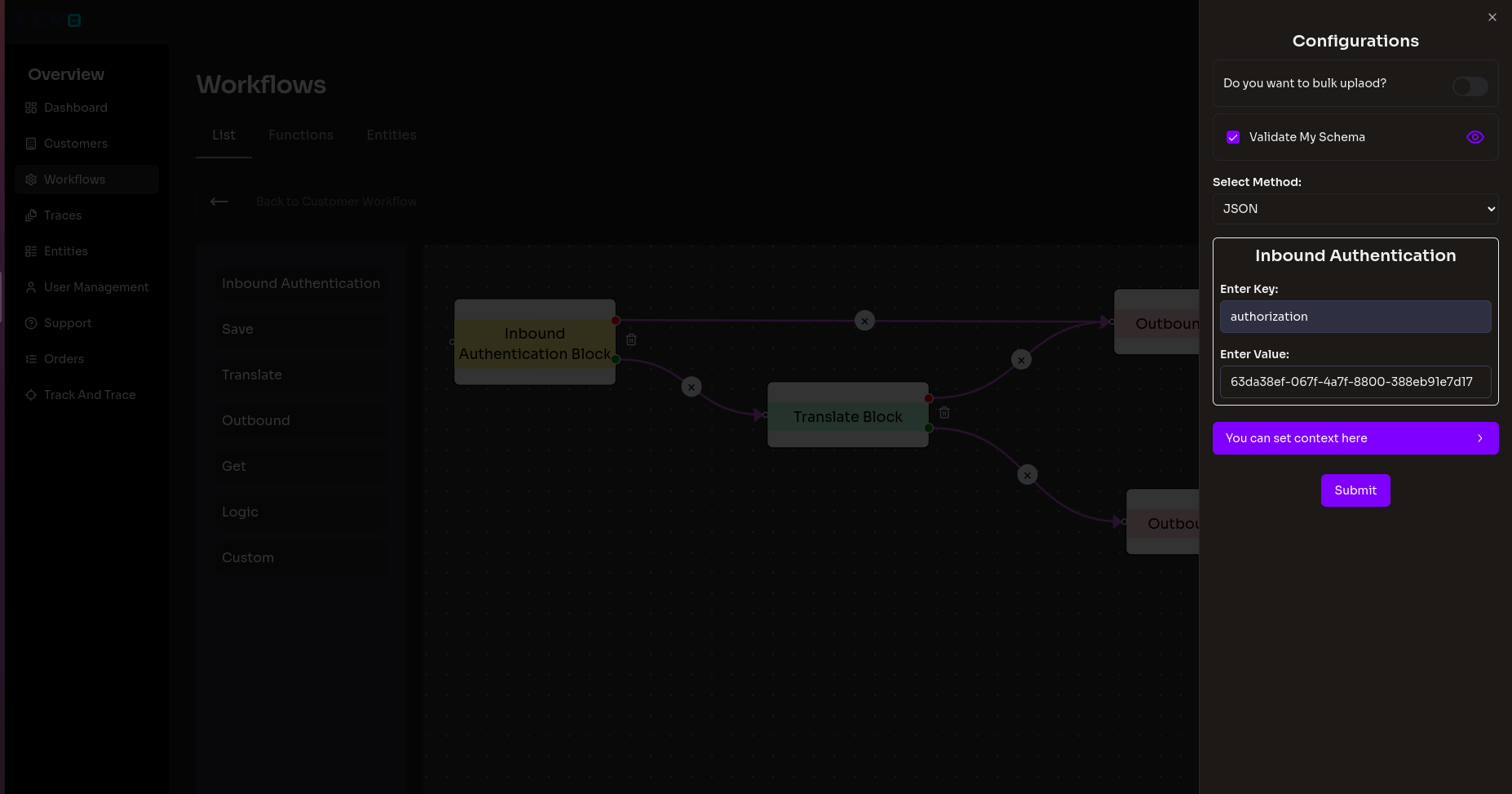
      Configure each block
    When things break

    Because sooner or later, a partner sends you garbage

    Integrations do not fail politely. What matters is how fast you can see it and fix it.

    Trace #4471Failed
    1. 01Fetch from SFTP3 files · 412 KB
    2. 02Parse CSV1,204 rows
    3. 03Map to carrier schemarow 847
    4. 04POST to carrier APInot reached

    error · row 847:
    expected weight_kg, received "240 lb"

    Illustrative — not live dataRetry

    Every run is traced

    Open any run and see it step by step — the payload that came in, what each block did to it, and exactly which step failed.

    Retry without redeploying

    Fix the upstream problem, hit retry on the failed run, and it picks up again. No redeploy, no re-sending files by hand.

    Export for the awkward conversation

    Pull traces out to Excel when a partner insists the file was never sent, and show them precisely what arrived and when.

    Get started with CrossDock

    Start Free, Upgrade Later

    Free

    $12 credit/month to try a first integration.

    $0/month

    What's included

    • Workflows: $11/workflow
    • Workflow Transactions: $0.09/transaction
    • Setup Cost: $30/hour (if required)
    • Payload Size: 1MB
    • Max Workflows: 1
    • Max Transactions: 100/month
    • Storage Duration: 90 days
    • Max Workflow Steps: 10
    Most popular

    Essential

    Perfect for small sized businesses.

    $29.99/month

    What's included

    • Workflows: $11/workflow
    • Workflow Transactions: $0.09/transaction
    • Setup Cost: $30/hour (if required)
    • Payload Size: 1MB
    • Max Workflows: 20
    • Max Transactions: 5000/month
    • Storage Duration: 90 days
    • Max Workflow Steps: 10

    Enterprise

    Perfect for large-scale enterprises.

    Custom

    What's included

    • Dedicated onboarding with Fero
    • Priority support
    • Setup Cost: $10,000
    • Payload Size: Customizable up to 1GB
    • Max Workflows: No limit
    • Max Transactions: No limit
    • Storage Duration: Up to 3 years
    • Max Workflow Steps: 100
      Linkedin